
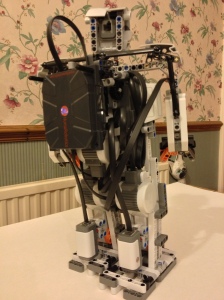
After a few late nights / mornings I finally got my second robot chatting with me via Salesforce Chatter! I chose to switch designs as it was easier to mount the Wifi sensor and move this robot around than the Alpha Rex. You cannot see it in the video but I was controlling it via the Chatter app on my iPhone, I took some screenshots after the video.

![photo[1]](https://brickinthecloud.com/wp-content/uploads/2013/03/photo1.png)
The NXC code I developed for this communicates to Salesforce via a custom Heroku RESTful Service. Which provides two services /command and /chat that wrap the Chatter API in something easier to code against in NXC. I’ll share the Java code for these services in a later blog. In the meantime enjoy!
task main()
{
   SetSensorLight(S3, true);
   if (quickConnect(WB_PORT,"ssid",WB_SECURITY_WPA2,"pass"))
   {
    string lastCommand;
    while (true)
    {
     string command = quickGETHostname(WB_PORT,"brickinthecloud.herokuapp.com","/services/command");
     if (command!="") {
       TextOut(0,LCD_LINE1, "Cmd:" + command + "      " );
       if(strcmp(command, lastCommand)!=0)
       {
          string message = "Afirmative!";
          if(strcmp(command, "Status?")==0)
          {
             float volts = BatteryLevel() / 1000.0;
             message = FormatNum("Battery:%5.3f", volts);
          }
          else if(strcmp(command, "Take aim!")==0)
          {
             RotateMotor(OUT_B, 180, 180);
             RotateMotor(OUT_C, 180, 180);
          }
          else if(strcmp(command, "Fire!")==0)
          {
             RotateMotor(OUT_A, 360, 360);
          }
          else if(strcmp(command, "Light on!")==0)
          {
             SetSensorColorRed(S3);
          }
          else if(strcmp(command, "Light off!")==0)
          {
             SetSensorColorNone(S3);
          }
          string response = quickGETHostname(WB_PORT,"brickinthecloud.herokuapp.com","/services/chat?message=" + message + "&comment=true");
          TextOut(0,LCD_LINE1, "Response:" + response + "      " );
          strcpy(lastCommand, command);
       }
     }
     else {
       TextOut(0,LCD_LINE1,"GET ERROR");
     }
    }
   }
}





 Brick in the Cloud